
This is an old revision of the document!
Table of Contents
Custom Reports: How-To
In the following guide, you will learn how to create custom reports. As standards, BeCloud's platform provides a series of built-in reports that will help the customer analyze the overall statistics of any kind of interaction flow but since the built-in reports don't provide some data (eg. when you build a custom flow, or when the customer demands to retrieve a specific data) they can be customized by a BeCloud's user to satisfy the customer demand.
To be able to create a custom report you must satisfy some requirements, specifically:
- An average knowledge of SQL, the more focussed on MariaDB, the merrier;
- Have installed a query constructor application;
- Have installed JasperSoft Reports Studio;
If it's your first time downloading these applications, please seek the download links in the Resources chapter of this tutorial.
Resources
As per resources where download some applications, these are the ones suggested by the BeCloud Technical team:
- SQL formulas and tricks: https://www.w3schools.com/sql/
- DBeaver - SQL Constructor: https://dbeaver.io/download/
- JasperSoft Reports Studio - Report builder: https://community.jaspersoft.com/download-jaspersoft/commercial-edition/
Starting with Building the Custom Report
For starters, you must log in to the Admin page of the tenant in which the custom report will be uploaded. This is because the custom report will be based on an existing report, which will be called “Template” in this guide, so you must first locate the table that you will interrogate for extrapolating the demanded data/pieces of information for constructing the query. These built-in reports can be downloaded from the Admin page following the pattern “Reporting > Report Templates” and by clicking on the desired Template you can download the .jrxml file.
As per the Example of this scope, the following tutorial will be based on the report Call Detail and the custom report built for Beeasy “Riepilogo Annuo Linea Gestioni” for its complexity.
The scope of this report was to have a monthly/daily report of handled calls for each Toll-Free number, with also the handled times (eg. answered in 5s, 10s, 20s …, abandoned in 5s, 10s, 20s …). Given this context, the first approach you must handle is the kind of Template you must download, in this case, since the query has various intervals, it was first downloaded the “Service in Time - Voice and Chat” report.
Open the .jrxml file with the JasperSoft Report Studio application and double-click the columns to access the edit page where the main SQL query is located (1) and access the “Dataset and Query Dialog” (2):
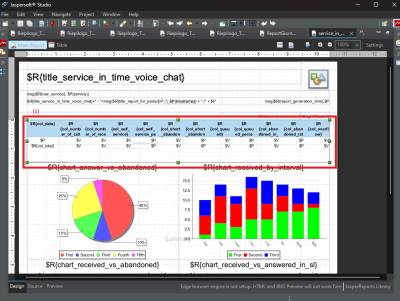
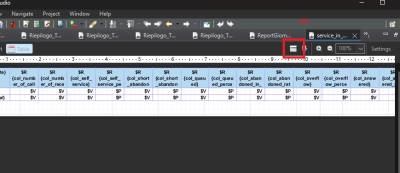
Here you will have a template query where you can build your desired query. In the case of the report “Riepilogo Annuo Linea Gestioni”, the custom query was built in the following:
SELECT
    id,
    start_time,
    DATE_FORMAT(start_time, '%d/%m/%Y') as full_date,
    DATE_FORMAT(start_time, '%W') as formatted_day,
    (CASE
        WHEN custom1 LIKE '%Crema%' THEN 'CREMA'
        WHEN custom1 LIKE '%Cremona%' THEN 'CREMONA'
        WHEN custom1 LIKE '%Lodi%' THEN 'LODI'
        WHEN custom1 LIKE '%Rovato%' THEN 'ROVATO'
    END) as nv,
    COUNT(CASE
        WHEN (queue_time > 0 OR pending_time > 0) THEN 1
    END) as offered,
    COUNT(CASE
        WHEN (talk_time > 0) AND (disposition NOT LIKE 'ABANDONED%' ) THEN 1
    END) as answered,
    ROUND((COUNT(CASE
        WHEN (talk_time > 0) AND (disposition NOT LIKE 'ABANDONED%' ) THEN 1
    END) * 100) / NULLIF(COUNT(CASE
        WHEN (queue_time > 0 OR pending_time > 0) THEN 1
    END), 0), 2) as perc_answered,
    (COUNT(CASE
        WHEN (queue_time > 0 OR pending_time > 0) THEN 1
    END) - COUNT(CASE
        WHEN (talk_time > 0) AND (disposition NOT LIKE 'ABANDONED%' ) THEN 1
    END)) as abandoned,
    ROUND(99 + (COUNT(CASE
        WHEN (queue_time > 0 OR pending_time > 0) THEN 1
    END) - COUNT(CASE
        WHEN (talk_time > 0) AND (disposition NOT LIKE 'ABANDONED%' ) THEN 1
    END) * 100 ) / NULLIF(COUNT(CASE
        WHEN (queue_time > 0 OR pending_time > 0) THEN 1
    END), 0), 2) as perc_abandoned,
    (SUM(queue_time) + SUM(pending_time)) as tma,
    AVG(talk_time) as tmc,
    COUNT(CASE
        WHEN pending_time < 5 AND (disposition NOT LIKE 'ABANDONED%' ) AND custom1 IS NOT NULL THEN 1
    END) as answered_5,
    COUNT(CASE
        WHEN pending_time < 10 AND (disposition NOT LIKE 'ABANDONED%' ) THEN 1
    END) as answered_10,
    COUNT(CASE
        WHEN pending_time < 20 AND (disposition NOT LIKE 'ABANDONED%' ) THEN 1
    END) as answered_20,
    COUNT(CASE
        WHEN pending_time < 30 AND (disposition NOT LIKE 'ABANDONED%' ) THEN 1
    END) as answered_30,
    COUNT(CASE
        WHEN pending_time < 40 AND (disposition NOT LIKE 'ABANDONED%' ) THEN 1
    END) as answered_40,
    (COUNT(CASE
        WHEN (queue_time < 5 OR pending_time < 5) AND (disposition LIKE 'ABANDONED%' ) THEN 1
    END) - COUNT(CASE
        WHEN (talk_time < 0) AND (disposition LIKE 'ABANDONED%' )THEN 1
    END)) as abandoned_5,
        (COUNT(CASE
        WHEN (queue_time < 10 OR pending_time < 10) AND (disposition LIKE 'ABANDONED%' ) THEN 1
    END) - COUNT(CASE
        WHEN (talk_time < 0) AND (disposition LIKE 'ABANDONED%' ) THEN 1
    END)) as abandoned_10,
        (COUNT(CASE
        WHEN (queue_time < 20 OR pending_time < 20) AND (disposition LIKE 'ABANDONED%' ) THEN 1
    END) - COUNT(CASE
        WHEN (talk_time < 0) AND (disposition LIKE 'ABANDONED%' )  THEN 1
    END)) as abandoned_20,
        (COUNT(CASE
        WHEN (queue_time < 30 OR pending_time < 30) AND (disposition LIKE 'ABANDONED%' ) THEN 1
    END) - COUNT(CASE
        WHEN (talk_time < 0) AND (disposition LIKE 'ABANDONED%' )  THEN 1
    END)) as abandoned_30,
        (COUNT(CASE
        WHEN (queue_time < 40 OR pending_time < 40) AND (disposition LIKE 'ABANDONED%' ) THEN 1
    END) - COUNT(CASE
        WHEN (talk_time < 0) AND (disposition LIKE 'ABANDONED%' )  THEN 1
    END)) as abandoned_40
FROM
    beeasy_it.call_detail cd
WHERE
    start_time >= $P{start_time} AND start_time < $P{end_time}
    AND disposition NOT LIKE 'TRANSFERRED' AND disposition NOT IN ('CONFERENCED', 'CALLER_TRANSFERRED')
    AND service_name = 'Linea Gestioni'
    AND caller_phone_type = 'EXTERNAL' AND callee_phone_type = 'INTERNAL'
    AND (media_type <> 'EMAIL' or media_type is null)
    AND (CASE
        WHEN custom1 LIKE '%Crema%' THEN 'CREMA'
        WHEN custom1 LIKE '%Cremona%' THEN 'CREMONA'
        WHEN custom1 LIKE '%Lodi%' THEN 'LODI'
        WHEN custom1 LIKE '%Rovato%' THEN 'ROVATO'
    END) IS NOT NULL
    AND (queue_time > 0 or pending_time > 0)
GROUP BY
    DATE_FORMAT(start_time, '%d/%m/%Y'),
    (CASE
        WHEN custom1 LIKE '%Crema%' THEN 'CREMA'
        WHEN custom1 LIKE '%Cremona%' THEN 'CREMONA'
        WHEN custom1 LIKE '%Lodi%' THEN 'LODI'
        WHEN custom1 LIKE '%Rovato%' THEN 'ROVATO'
    END) asc;