
This is an old revision of the document!
Table of Contents
Access Wordpress files
Downloading Filezilla
FileZilla allows to access both FTP and SFTP servers, you can download it here for Windows and here for MacOS. Then run the executable and follow the on-screen commands.
If you use Linux look into your package manager.
Setup
- On the top left, open “File” → “Site Manager”
- Click on “New Site” and insert the following informations:
* Protocol: SFTP
* Host: becloudsolutions.com
* Logon Type: Key file
* User: admin
* Key file: full path of your .pem file (contact your administrator to obtain this)

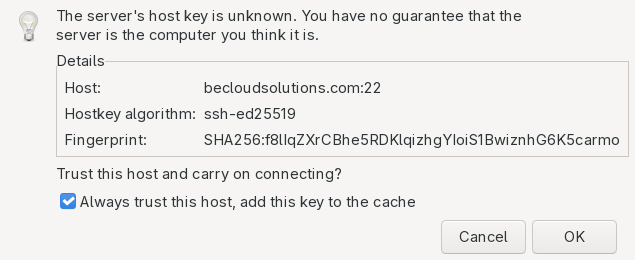
- During the first login, it may ask about the key trust: click on “Always trust this host” and click “OK”


Accessing the files
- From the “Site Manager” select the desired connection and click “Connect”.
- In the “Remote site” window modify the path and insert
/var/www/html/wordpress
Clusters have shared domain between two machines (for example, Prod5_Core1 and Prod5_Core2 are both pointed by *beincontact.becloudsolutions.com*), to change the weight select one of the two record entry, on the left panel click “Edit record”, change the param “Weight” from 100 to 0, then save.
You have to do this for the machine where you are not trying to renew the certificates (for example, you want to renew Prod5_Core1, change the param of Prod5_Core2, renew the 1 and then convert everything to renew the 2), then restore the weight and repeat the process for the second server.
sudo certbot-3 certonly --nginx -d **domain**,**domain**,*etc*
Copy-paste domains Core1:
sudo certbot-3 certonly --nginx -d core1.beincontact.becloudsolutions.com,beincontact.becloudsolutions.com,elettric80.beincontact.becloudsolutions.com,prysmianuk.beincontact.becloudsolutions.com,prysmianib.beincontact.becloudsolutions.com,alidays.beincontact.becloudsolutions.com,aria.beincontact.becloudsolutions.com,beeasy.beincontact.becloudsolutions.com,prysmianfr.beincontact.becloudsolutions.com,fives.beincontact.becloudsolutions.com,medicair.beincontact.becloudsolutions.com,golilla.beincontact.becloudsolutions.com,excellgo.beincontact.becloudsolutions.com,newtime.beincontact.becloudsolutions.com,aetnagroup.beincontact.becloudsolutions.com,estendo.beincontact.becloudsolutions.com,volvo.beincontact.becloudsolutions.com,prysmiantk.beincontact.becloudsolutions.com,sonova.beincontact.becloudsolutions.com,cft.beincontact.becloudsolutions.com,basile.beincontact.becloudsolutions.com,e80it.beincontact.becloudsolutions.com,pvacque.beincontact.becloudsolutions.com
Copy-paste domains Core2:
sudo certbot-3 certonly --nginx -d core2.beincontact.becloudsolutions.com,beincontact.becloudsolutions.com,elettric80.beincontact.becloudsolutions.com,prysmianuk.beincontact.becloudsolutions.com,prysmianib.beincontact.becloudsolutions.com,alidays.beincontact.becloudsolutions.com,aria.beincontact.becloudsolutions.com,beeasy.beincontact.becloudsolutions.com,prysmianfr.beincontact.becloudsolutions.com,fives.beincontact.becloudsolutions.com,medicair.beincontact.becloudsolutions.com,golilla.beincontact.becloudsolutions.com,excellgo.beincontact.becloudsolutions.com,newtime.beincontact.becloudsolutions.com,aetnagroup.beincontact.becloudsolutions.com,estendo.beincontact.becloudsolutions.com,volvo.beincontact.becloudsolutions.com,prysmiantk.beincontact.becloudsolutions.com,sonova.beincontact.becloudsolutions.com,cft.beincontact.becloudsolutions.com,basile.beincontact.becloudsolutions.com,e80it.beincontact.becloudsolutions.com,pvacque.beincontact.becloudsolutions.com
Acme-challenge
Istances that need certs for operation
- Prod5_Core1/2(Sydney)
(There are shared Outlook calendars for all expiring certs)
Commands
Acme-challenges clusters
For clusters, you need to run the command on both “Core” istances, but first you have to modify the “weight” of the domain. Login to AWS DNS and select the desired Hosted Zone.
Clusters have shared domain between two machines (for example, Prod5_Core1 and Prod5_Core2 are both pointed by *beincontact.becloudsolutions.com*), to change the weight select one of the two record entry, on the left panel click “Edit record”, change the param “Weight” from 100 to 0, then save.
You have to do this for the machine where you are not trying to renew the certificates (for example, you want to renew Prod5_Core1, change the param of Prod5_Core2, renew the 1 and then convert everything to renew the 2), then restore the weight and repeat the process for the second server.
Follow the instructions on screen and replace old entries in the DNS, make a copy of the old values in case you need to use the old certs. Do not create multiple records for one domain, even if certbot tell you to do it, you can't in AWS. Be aware that you have to deploy all domains before terminating the script (it will warn you when it's almost done), Certbot check for deployment only in the end, not every time it ask you to deploy a domain.
certbot certonly --manual --preferred-challenges dns --key-type rsa -d **domain**,**domain**,*etc*
Copy-paste domains:
certbot certonly --manual --preferred-challenges dns --key-type rsa -d beincontact2.becloudsolutions.com,core1.beincontact2.becloudsolutions.com,core2.beincontact2.becloudsolutions.com,prysmianau.beincontact2.becloudsolutions.com,humecity.beincontact2.becloudsolutions.com,benetas.beincontact2.becloudsolutions.com
Follow the wizard and read the final output, you need to cd into the directory of the certificate before running
the commands to preare the certs (will be in /etc/letsencrypt/live/)
Certs preparation
\cp -b privkey.pem server.key
cat fullchain.pem | cat - privkey.pem > server.pem
\cp -b server.key /etc/servicepattern/
\cp -b server.pem /etc/servicepattern/
Restart services
systemctl restart nginx && systemctl restart agentserver